At this puzzle, but not on others my recipe seems to freeze the program after a while. This has happened int the past with recipe acid tweeker, and it happens more often if the filters are disabled. Now, even with all filters enabled my programs freeze one after the other one at puzzle 2214, but not in the others. The effect is visible both on desktop and laptop, and even the number of tandem tasks does not influence the behavior of the error. I have no idea what to do beside closing and opening the programs.
@Sandrix72 Does this happen with a particular recipe? Can you share an example recipe that has caused this freezing behavior?
It would also be helpful if you could attach a log.txt file from a frozen client. After closing Foldit (but before reopening the program), you can find log.txt in the data directory and drag the file into a forum post here.
I have to reproduce it, but will not be hard. The recipe is a self one (), it is stored in my cookbook.
Design directory: Sandrix72_CreateStructures 1.37, functions 9 (as it is, just ok) and 22 (using 3 helix).
One client on 2214 had tons of popups as shown below. The popups seemed to slow things down, but the recipe did eventually finish.
Another client running the same recipe at the same time didn't have the popups.
So far I'm unable to reproduce. I'm still running the popup client, with no restart, but now the recipe isn't producing popups.
I also made a copy of the Foldit directory for the popup client. Running from the copy also doesn't result in popups.
I was hoping this was a setting issue, but obviously, that's not it. I think this client did something odd, where the recipe output window didn't show any output at first, even though the scriptlog file showed the output. A little later, the output started showing up. Not sure why that happened, and obviously, it's all better now.
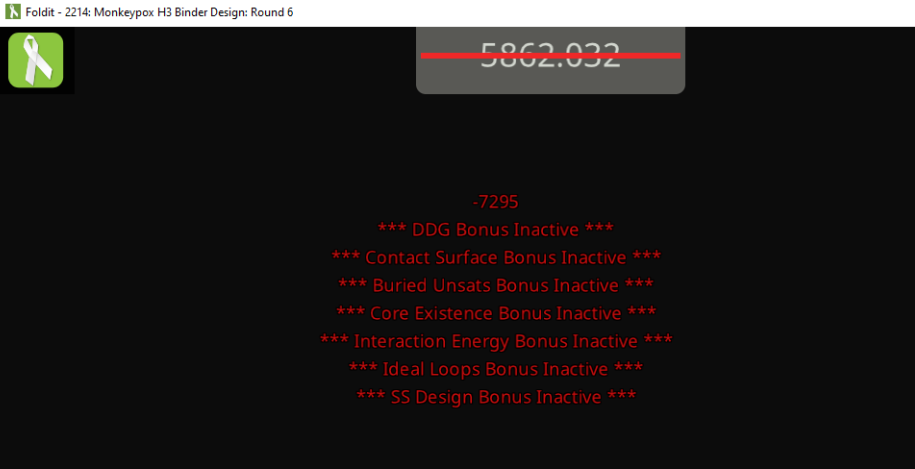
It turns out that it's easy to get the popups.
- Start a recipe that toggles filters.
- With the cookbook still open, double-click on another recipe to run it.
Attempting to start a recipe while one is already running results in the filter-related messages shown in the previous post, along with other popups such as "Mutated to Tyrosine", that are normally suppressed for recipes.
If the recipe output window is open, step 2 clears it. If the recipe output window was closed, only new messages will be displayed when you open it. Normally, you'd expect to be able to scroll back to messages written before the recipe output window was opened, but not after trying to start a second recipe.
It's not clear if the popups cause a performance issue, but the client does seem more sluggish than usual.
It probably makes sense for the cookbook window to disappear, as it used to before the switch.
If the cookbook is displayed, the run recipe function should be disabled while a recipe is in progress.
I'll try an A-B test next, running the same recipe on the same pose, with and without popups.
"It probably makes sense for the cookbook window to disappear, as it used to before the switch."
NO ! That would force us to use even more mouseclicks and keystrokes to do what we do.
They should fix the bugs and implement proper UI design making it impossible to start a new script while one is running.
The A-B test finally completed.
The client with popups finished about 1.25 hours before the client without popups. Both took over 32 hours, so the difference is probably not significant.
The client with popups appeared frozen when I maximized its window. It took several minutes to refresh its display. During that time, it was "not responding", with the window grayed, the spinning disk, and so on. The recipe output window was still showing messages from hours earlier.
The client without popups maximized normally, with the recipe output window showing the most recent messages.