(FolditStandalone) Setting up custom electron density puzzles: quick tests

Started by rosie4loop

rosie4loop Lv 1

I am posting my notes here for those who would like to know the detailed steps to create custom Foldit puzzles with FolditStandalone and share it privately, e.g. for the training of students using in-house data yet to be published, or if you have concerns to let students create a game account.

You may also refer to the following article first for a brief overview of using Foldit in class:

  1. Official Foldit forum post for educators which provide detailed information on how to create the puzzle config. files (although lacking instructions on more updated tools or puzzle types)
  2. Dsilva, L., Mittal, S., Koepnick, B., Flatten, J., Cooper, S., and Horowitz, S. (2019) Creating custom Foldit puzzles for teaching biochemistry. Biochemistry and Molecular Biology Education 47, 133–139. [link]

Just to test the potential of custom Foldit puzzles for educational purposes. Please let me know for any issues – I am still new to Foldit and xtal structure solution.

Different concepts can be illustrated with the same puzzle, instructors should decide what to emphasize on according to the intended learning outcomes. For example,

  • puzzle B let the student do something similar to what a crystallographer does to check how mutating the protein changes its conformation, ultizing the Foldit interface that is simpler than the actual tool
  • combining puzzles B and C one could demonstrate how a point mutation in the active site results in the lost of drug affinity.

Hence I am skipping the aim of each puzzle in my discussion, focusing only on the technical details.

Please also note that I am only testing the minimal setup of puzzles, WITHOUT the “.puzzle_setup” configuration file that restricts movement, locks tools, limits range of mutatable residues etc. You may refer to the instructions provided by Foldit developers on how to create the setup files.

Disclaimer:
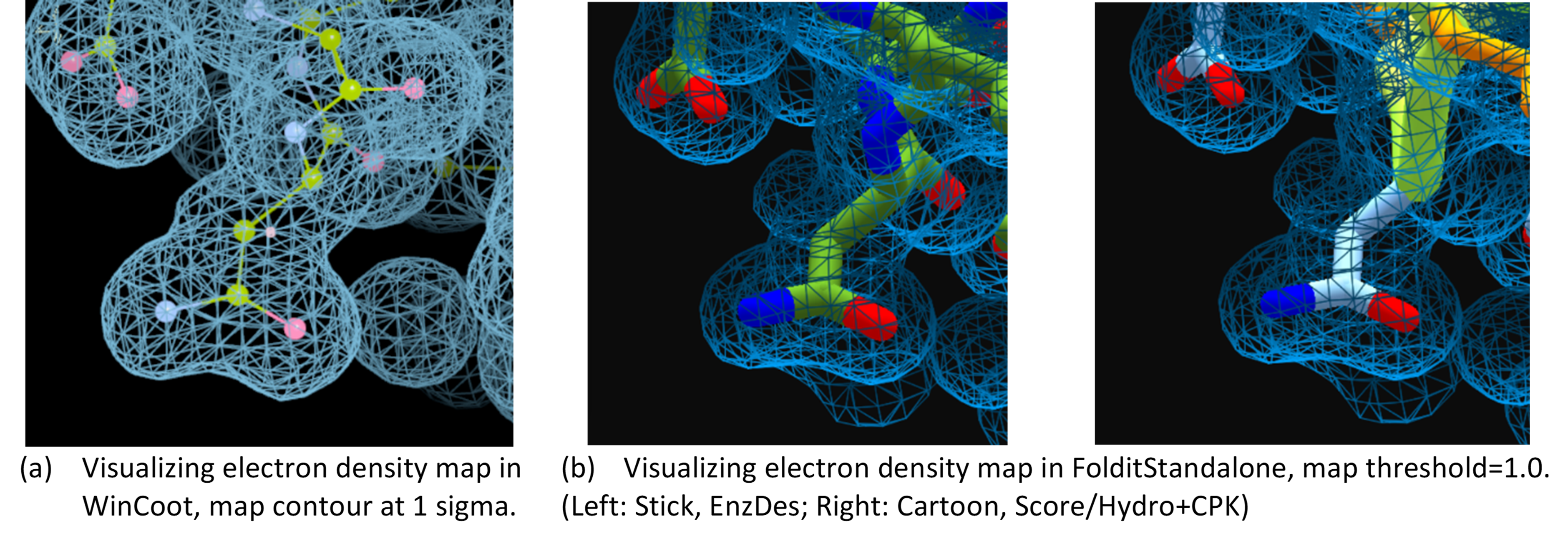
This is only a test on creating custom Foldit puzzles for educational purpose to demonstrate the process of manual model refinement, taking advantage of Foldit's comprehensive in-app biochemistry tutorials for an all-in-one learning experience. It should NOT be used for practical structure solution NOR as training material of structure solution from X-ray data. This is not recommended for practical manual remodel since the 2Fo-Fc map is known to be model biased. Instead, use your favourite crystallography software like PHENIX/CCP4 and coot to (re)calculate the omit map of the poorly modelled region and model on that. But I know that the 3D rendering in Foldit is attractive especially for teaching purpose, compared to the simple line-rendering in WinCoot/Coot (see the figure below!).
Please consult relevant materials, e.g. documentation and tutorials of PHENIX or CCP4 for methods of practical X-ray structure determination.


Contents:
A. A minimal, standard electron density puzzle
B. Electron density puzzle to model a mutant structure starting from a wildtype structure
C. ”Guess the ligand” electron density puzzle (TBD)

Software versions in this test:

  1. Phenix 1.20.1-4487 and WinCoot 0.9.8.1 on Windows 10,
  2. Folditstandalone: 20230109-b54c9a359c-win_x64-INTERNAL on Windows 10
  3. Rosetta 3.12 bundle compiled on Linux Mint 19.1

Other tools
• (Puzzle B) Your favourite tool of structure modelling and alignment, e.g. UCSF Chimera, PyMOL, TM-align, or can use the superposition tool in phenix as outlined here.
• (Puzzle C) Text editor like Notepad/Notepad++/gedit

Summary of the files required to set up each puzzle:

FolditStandalone input for puzzle A

  1. xxx.pdb
    • Starting model
  2. xxx.density
    • 2mfo-dfc map in ccp4 format
  3. xxx.wts_patch
    • file telling Foldit how to score with the density info. If not included as you import the files, foldit would show you a warning.

ADDITIONAL input for puzzle B

  1. xxx.align
    • Aligned fasta of template and query
  2. xxx.template.pdb
    • Template structure pdb

ADDITIONAL input for puzzle C

  1. xxx.params
    • Ligand params in rosetta format

Reference:

  1. Phenix documentation on map trimming and mtz2map
  2. Rosetta documentation about reading electron density map files
  3. FolditStandalone quickstart guide
  4. My previous notes on setting up a custom, minimal small-molecule design puzzle
  5. Dsilva, L., Mittal, S., Koepnick, B., Flatten, J., Cooper, S., and Horowitz, S. (2019) Creating custom Foldit puzzles for teaching biochemistry. Biochemistry and Molecular Biology Education 47, 133–139. [article][example files]
  6. Official Foldit forum post for educators, with the instructions and examples.
rosie4loop Lv 1

A. Minimal, “standard” electron density puzzle

Remarks: It’s probably better to use a density map of lower resolution and without water density. I keep on using this lysozyme model as in my previous test of small molecule puzzle setup for simplicity.

I. Preparation
Setting up custom electron density puzzle in FolditStandalone can be tricky since we cannot use the map coefficients generated by PHENIX or from the PDB, and the lack of documentation on the ACTUAL file format recognized by the software. Here I briefly outline the steps to successfully prepare minimal input files for an electron density puzzle using the same lysozyme example as my previous test (PDB code: 3HTB). Since it is not intended to be a Phenix tutorial, I am just listing the steps without providing screenshots here.

  1. Preparing xxx.pdb and xxx.density
    • a. Download 3htb.pdb and 3htb_phases.mtz from the RCSB pdb, then start a new project in phenix.
    • b. Use the “Cut out density” tool to extract the map around the protein to get a cleaner view in later steps.
    • c. Use the “Create a map from map coefficients” tool to generate a 2mFo-DFc map in CCP4 format from the trimmed mtz file in step (b).
    • d. Copy the “.pdb” from step (b) and “.ccp4” from step (c) into a new folder for later use.
    • e. Rename the copied “.pdb” file and “.ccp4” file into “xxx.pdb” and “xxx.density” respectively, where “xxx” can be any basename you like.
    • f. Its also a good idea to open the files in Coot first to make sure the pdb structure fits inside the electron density.
  2. xxx.wts_patch

II. Setting up the minimal version of custom puzzle

  1. Import the “xxx.pdb”, “xxx.density” and “xxx.wts_patch” into FolditStandalone.
  2. Check if the model and density are ok.
    • Note that the resolution in this example is too high, the water density can be distracting.
    • It’s a shame that currently Foldit cannot be used to model the crystal water efficiently (probably need an extra params file), these molecules may represent important water molecules for enzymatic functions or substrate binding.
  3. Save the session for later use or sharing, e.g. I call it “std_density”.
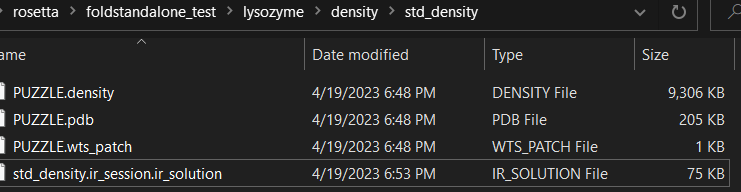
  4. The session file contains everything you need to load a electron density puzzle, that when being imported into FolditStandalone it will create a folder with all these puzzle files.

rosie4loop Lv 1

I cannot use Foldit and FolditStandalone for teaching this year for several reasons, but since I've tested these puzzle ideas already I'm outlining the procedure here.
I'll add screenshots when I have time.

Puzzle B: Modelling mutant structure from WT template

  1. Preparation before loading the files in FolditStandalone
    • The electron density map (e.g. PHENIX, CCP4 etc)
      • a round of molecular replacement
        • extract one chain of the pdb of the wildtype structure as template
        • use the mtz file of the mutant
      • a round of refinement
      • deleted the 4 residues being mutated from the WT pdb and recalculate the map
      • trim the recalculated map around the original template
      • convert the trimmed map into CCP4 format
    • the PDB file
      • Make sure all the PDB files are aligned to the template, which is aligned to the map. may use the alignment tool in PHENIX or your favorite molecular modelling software.
      • clean the PDB files to keep only protein residues.
      • use the .pdb suffix for the aligned WT pdb.
      • use the .template.pdb suffix for the aligned
    • alignment file
    • weight file
      • use the weight file from the example file link.
  2. Loading the puzzle files in to FolditStandalone
    • Checking
      • Check if the alignment panel is working correctly
      • Note that if the template fasta is different from the template pdb, FolditStandalone use the sequence of the PDB template in the alignment panel
    • settings mutatable residues in puzzle setup
  3. What the students are expected to do
    • find the mutated residues from the alignment panel
    • do the mutation.
    • fit the mutated residues in map

Comments

  • use a map of lower resolution
  • sequence in alignment panel wouldn't change after mutation which makes it difficult to identify the residues already modified.
  • high-resolution maps have the following issues:
    • alternative configurations with partial occupacies.
    • water density can be distracting.

rosie4loop Lv 1

July 6, 2023

  • adding link to puzzle B in TOC post
  • adding explanation on skipping the concept to be discussed on with a puzzle, and example of puzzle aims.

June 26, 2023

  • Added procedures of puzzle B (alignment + ED)

  • TBD

    1. procedures of "guess the ligand" ED puzzle idea
    2. links in the 1st post
    3. add screenshot when I have time

TBD May 14, 2023

  1. fix typo in visualization comparison (map threshold) and add the ball-and-stick representation in coot to be fair (post 1)
  2. add screenshot in standard density puzzle
  3. fix the minor issues in software requirement section
  4. finalize puzzle B test and screenshot
  5. think of a shorter title of this puzzle

horowsah Staff Lv 1

This is great- there's a really wide variety of puzzles people can make that can illustrate different concepts using electron density.